WhatsApp has evolved rapidly over the years. As of 2026, WhatsApp is no longer just a messaging app. Now it has become a favourite and powerful marketing platform for businesses of all sizes, and it’s shaping the future of marketing.
In India alone, WhatsApp Business users are around 1 billion, which tells us that WhatsApp is no longer just a personal messaging tool.
Customers move beyond just browsing websites, sending emails or making calls is not enough. They want immediate, personalised responses, which can be delivered via WhatsApp.
Whether it’s sales or marketing, WhatsApp supports both. You can instantly respond to customers in real time, and multiple team members can handle a bundle of queries in the blink of an eye.
That’s why modern businesses need a WhatsApp shared team inbox so they can handle a large volume of queries without any hindrance and without losing track of customer conversations.
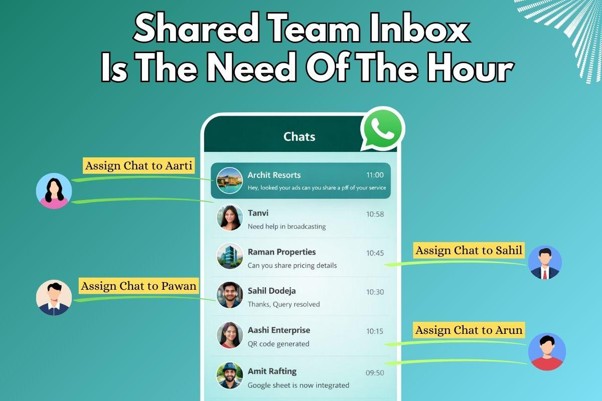
Table of Contents
ToggleNow let’s deep dive into the details!
What’s WhatsApp's shared team inbox, and why is it the need of the hour?
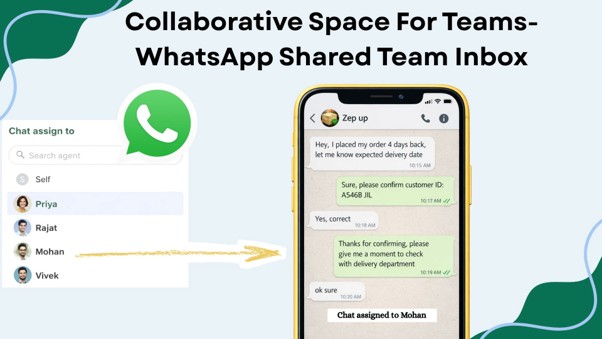
WhatsApp shared team inbox is a centralised dashboard where multiple team members can collaborate from a single place, and they can communicate with customers from an official WhatsApp number.
You can view all conversations in one place, allowing multiple team members to handle that query with ease.
You can assign a particular customer query to any of the team members and segment those conversations through Tags.
Why is it the need of the hour?
Nowadays, customers would not hesitate to switch if businesses don’t respond on time. When it comes to instant interaction, WhatsApp is the ultimate king.
Here, the response rate is around 98%, the click-through rate is around 45-60%, and it has a simple, user-friendly interface that enables seamless adoption for customers and businesses.
If you want to automate your WhatsApp, run click-to-WhatsApp ads, send personalised broadcasts, interactive messages, a shared team inbox, etc.
Then Dataacross is here to help you. We make your sales and marketing journey seamless, effective and efficient.
Why Businesses should use a WhatsApp Shared Team Inbox
If your inbox is overwhelmed with customer queries or you get messages from different platforms like Facebook or Instagram, and somehow you missed or haven’t replied to them for days.
Then it’s obvious you are going to lose that customer. But wait, what if you get a platform where you can assign all those queries to the right team member, and all those messages come in one inbox?
Sounds good!
This is where the WhatsApp shared team inbox comes into the picture!
It allows all team members to log into one centralised dashboard, where all members can see customer chats, assign conversations and respond to them quickly without switching tabs.
Also, you can add notes to it, which helps in tracking conversations and improves the customer journey through better follow-ups.
You can add as many team members, whether 2 or 50. This helps businesses to handle queries in real time and assign a particular query to a particular team member to avoid duplicate replies.
Instant communication is the future of businesses. With WhatsApp shared team inbox and automation, you can achieve that easily.
Key difference between WhatsApp Business and WhatsApp Business API(Team Inbox feature).
The WhatsApp Business App is useful for small or local businesses, but it has huge limitations when it comes to team collaboration.
Customer conversations are typically handled by one individual, making it difficult for a growing business to manage chats by different team members.
Another huge drawback is its broadcast limitation, which is only up to 256 per broadcast.
But in WhatsApp Business API, these limitations come to an end with:
- Team collaboration: Multiple team members can monitor, assign and transfer chats to one another.
- Centralised dashboard: With one active number, multiple members can log in to the platform
- Add filters: Organise conversations by using filters like active or expired chats.
- Track Chat status: Whether it has been resolved, opened or pending.
- Add Internal notes: To keep the team aligned and informed about the latest update in customer chat.
Can multiple team members handle the same chat together?
Yes! This is the best thing about a shared team inbox, where multiple team members can handle the same chat simultaneously.
Imagine the assigned team member is unavailable. In such cases, they can easily assign their chats to another team member.
The new team member can instantly take over the conversation, review previous messages and even add internal notes for better understanding of customer journeys.
This ensures that no customer query is left unanswered. Customers never feel ignored.
It also makes work easier for the entire team. Customers receive timely responses, while team members can collaborate internally without any overlapping of work.
A WhatsApp shared team inbox allows the same chats to be handled by multiple members, improves customer engagement, ensures seamless coordination and smooth team collaboration.
Benefits of WhatsApp Shared team inbox:
1) Organised teamwork: A single WhatsApp account and multiple team members ensure seamless collaboration within the team.
2) Avoid duplicate replies: Immediately assign chats to the right team member. This will ensure who is handling the chat and eliminate the chance of overlap between different members.
3) Single and unified dashboard: All members can manage chats from a unified dashboard.
4) Internal Notes: Write notes on customer interactions to keep all chats well organised.
5) Tags: Are used for customer segmentation and to filter customer chats using labels.
6) 24/7 Customer response: Through automation, it can give round-the-clock support to customers.
7) Fast response rate: By immediately sending message templates, businesses can resolve queries and improve response time.
8) Conversation status: Allows businesses to mark each conversation as open, solved, unsolved, awaiting response or pending. This ensures better tracking of customer journeys.
WhatsApp Shared Team Inbox is the future of customer engagement
Over time, WhatsApp has evolved. Initially, it was just a messaging app. But now it has created abundant opportunities for businesses to provide real-time support to customers, which helps businesses to scale their operations in much larger regions.
Now, any business, whether big or small, can easily scale its business. When it comes to customer engagement or personalised communication, these can be done in real time through WhatsApp Business API.
Why is a Shared Team Inbox the future of customer engagement?
Through the WhatsApp shared team inbox, you can see all chats in a centralised chat screen, and you can communicate with customers in real-time, which streamlines communication.
Now assign the chat to the right team member so no random team member tackles that customer problem.
If somehow one customer is attended by multiple team members, each member can add notes, so the customer journey remains organised, and it enables seamless collaboration between team members and duplication of work can be avoided by the team.
Add tags to each chat so team members are aware of what to do with a particular chat in the customer journey.
Example: New lead, Old prospect, Payment done, Not interested lead, lost, etc.
This will help businesses to segment each customer based on their journey.You can also check the status of each chat in a shared team inbox, put labels on every chat to properly organise the customer journey, track customer interaction and understand the customer journey, whether that chat is open, pending, awaiting response or resolved, etc.
This will help businesses to improve customer engagement through the WhatsApp shared team inbox.
To sum up, WhatsApp shared inbox ensures real-time solutions and sets new benchmarks in customer engagement.
Assign roles to different team members and protect customer information with the help of number masking
To avoid confusion with customer queries between team members, you need to properly assign roles to each team member. Give a defined role to each team member.
● Team Leader = Manages and supervises the team. Ensure no customer query gets missed.
● Team Member = Handles customer queries directly.
Protect customer details with number masking: Whenever we add new team members to a shared team inbox and that member logs in to the dashboard, the client’s data will not be visible to that new member.
The member can handle chats, but the full client number will not be shown. This will maintain privacy, and members cannot misuse customer data easily.
Win-Win situation with WhatsApp shared team inbox for both customers and businesses
When businesses grow, there is a surge in customer queries, and to manage each chat in real-time, it is crucial that you have this feature in your WhatsApp Business API.
To avoid haphazard communication between businesses and customers. WhatsApp shared team inbox benefits not just businesses, but also customers.
This helps businesses to make the customer experience better and respond to customers in no time.
Benefits to businesses:
- Faster response time.
- Assign chat to the right team member.
- Reduce errors and duplication.
- Collaboration between team members.
- Add notes and tags to each conversation for better follow-ups.
- Send templates quickly.
- Timely response boosts customer retention.
- Mark chats based on their status.
Benefit to Customers:
- Consistent communication with businesses.
- No repeated conversations.
- Real-time assistance that improves satisfaction.
TAGS: To Organise Customer Journey
Tags provide the right direction to each chat and help in categorisation of each conversation.
Tags are labels that are given by team members to customers based on their interactions. Example: New lead, Pending bill, Enquiry, etc.
This simple feature is essential to businesses that organise customer journeys from start to end. One small feature, if used properly, can bring a significant impact on customer interaction and also improve how businesses manage customer engagement.
How to get started with the DataAcross WhatsApp API Shared Team Inbox.
- Connect your WhatsApp Business account. Sign up for DataAcross and connect your WhatsApp API number, or use the co-existence feature to connect with our app. Once connected, you can now see chats in the chat screen
- To connect agents, navigate to Settings and go to the Team section. Click on New agent. Now fill in the required information for team members, such as Name and Email, and assign respective roles to them.
- Now head over to the chat section to view all customer interactions. You can filter those conversations by using tags and assign each chat to the right team member.
The Conclusion
WhatsApp shared inbox is the need of the hour for businesses because fast communication helps businesses to retain more customers and build long-term trust with them.
As businesses grow, so does the influx of queries, and to pay heed to each query or chat, you need to streamline communication between different team members.
So, if you want to boost your customer responses or need centralised communication?
Then connect to Dataacross, where you can add multiple team members, assign each chat to different team members to ensure timely responses, and add notes to each chat so that you can improve customer response. There is much more to do.
WhatsApp shared team inbox provides real-time solutions for your growing business needs.
Whether you want a centralised dashboard, streamlined communication or enhanced customer response, a WhatsApp shared team inbox is all you need to scale efficiently.